
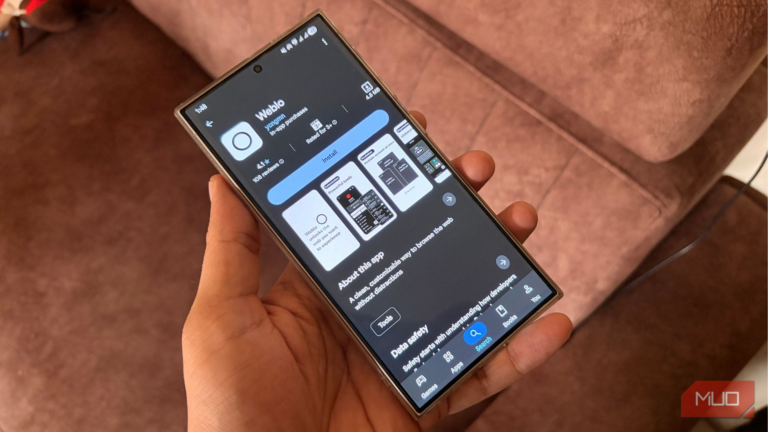

The internet is filled with information about literally anything. It is basically a digital graveyard. Whenever we want to know about something, let’s say how to bake a cake, we hop onto the internet and either watch videos or look for ingredients on one of the popular food blogs. When we like something, we immediately either take screenshots or bookmark it. Since I am in the technology content development field, my bookmark manager is filled with tech websites. I recently paid a visit to it and was quite surprised to see websites that I had saved but never visited.
Thankfully, my recent discovery of an app named Weblo completely changed the way I interact with the web. The best part, for the first time in many years, I read what I saved.

I replaced Chrome with DuckDuckGo on Windows and didn’t expect this outcome
I thought I’d go back to Chrome, but I’m staying.
The problem with traditional bookmarks
Out of sight, out of mind

Bookmarks are the best way to revisit websites that you found interesting while researching or just casually surfing the internet, especially when you do not have the time at that exact moment. However, there is a big drawback to bookmarks: they are inherently hidden.
Notably, you have to click on a menu, open a folder, and scroll through the endless wall of websites to find exactly what you are looking for. Since the bookmark manager easily becomes cluttered, searching for the bookmark you need becomes frustrating. And since they are hidden, there is no visual cue pushing me to open them, which is why they are just gathering digital dust.
I did find a workaround for this. So, instead of saving websites to the bookmark manager and letting them be there for eternity, I started leaving the tabs open on my favorite smartphone browser. But this did not work well, because after some time, my open tab count crossed 90.
This was also not good for my phone, as the open tabs were not only hogging the processor, but the browser also started misbehaving. On top of this, my phone’s battery also started depleting. Then, I found Weblo, and things changed.
Weblo changes the way you save the web
It’s a resource-friendly way to manage sites without taxing your phone

Weblo is also, not a web browser. It is also not another read-it-later app that you will easily find on the Google Play Store. Confused? Let me clear the air.
At its core, using Weblo, you can browse and surf the internet like any other web browser. However, instead of relying on traditional browser tabs or history logs, Weblo turns websites and pages you want to keep into structured collections. Additionally, you can create multiple isolated profiles, meaning your work-related research and personal browsing never have to mix.
Instead of tossing saved links into a folder, Weblo creates a dedicated, app-like environment for them. For instance, I will be doing a road trip across Europe this year. So, in place of creating a messy “Europe road trip” bookmark folder in the browser, I have set up a dedicated Weblo profile that is just for travel research. Whenever I open it, everything is perfectly organized, distraction-free, waiting for me.
And because Weblo has those structured site collections with icons for visual reminders, I know what to expect out of the website that I am about to click. I no longer have to search through the text-based bookmarks, and instead, the collection looks like a personalized magazine rack curated for me.
Weblo is better for my workflow
It comes with simple, yet a lot of effective features
Weblo comes with a bunch of features that otherwise would be available on other browsers as an extension. There is a Data Saver mode, which prevents images, videos, and audio from loading and saving data. If you have created a profile for a surprise event, you can lock it by turning on the Lock Weblo option, which would require authentication to unlock.
You get background playback and an effective ad-blocker built in. Also, you can force websites to show up in dark mode, good for those websites that are still living in the 19th century.
One of the highlights, though, is the Page Keeper option. It stores web pages for offline access, which can come in handy when the network isn’t as strong as you want it to be. There is no loading screen, no interface distractions, just the content you need without the internet.
There is a wide range of customization options. You can change the appearance of the browser from the good old black and white to basically any color you want. There is also an option to use the pitch-dark AMOLED Black theme. You can also categorize your most visited websites under different banners like AI, Social, News, etc.

- OS
-
Android
- Pricing model
-
Free, Paid
Weblo is a privacy-focused utility app that lets you transform your favorite websites into organized, lightweight “web apps” to enjoy a distraction-free, app-like browsing experience without the storage clutter of traditional applications.
Making the switch is okay-ish
Setting up Weblo takes some effort
Similar to other apps, Weblo isn’t perfect. Although it is the best app if you are tired of losing great articles to the bookmark abyss, setting up Weblo may feel like an actual process if you are addicted to one-tap wonders.
After you have downloaded the application, you get an interface with different categories. You can create one to keep all of your favorite websites. Now, to add a website, you have to choose a category, tap on the Plus (+) icon, then select Quick Add and manually enter the link by either typing or pasting the URL. The good thing is that you also have the option to bulk add websites or import them.
Once everything is set up, you need to click on the website to open more options. You have the option to add the website as a shortcut, clone it (good for people who have multiple social media profiles), launch it, and do all sorts of privacy and display tweaks to it.
Favorite websites no longer hidden
Weblo is a perfect option for those who often forget what they have saved or for those who want to put their favorite websites to work when needed. Adding a website to Weblo will show you how much cleaner and more focused the reading experience is when you strip away the usual browser clutter. You can also make use of the Weblo individual profiles that give you a clear separation between your work and personal life.