
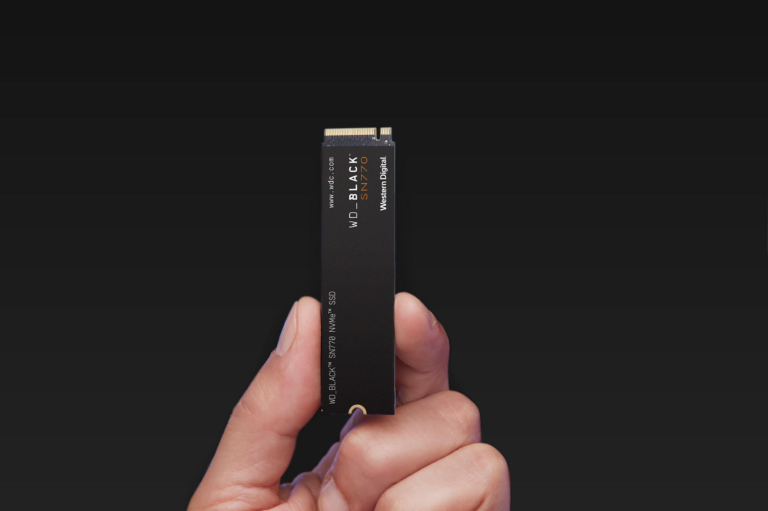

We all love a bargain, especially when it comes to PC building. You think that you should pour a big chunk of your budget into picking the best CPU and graphics card because you believe they are the heart. But for other parts like storage, you took the opposite route and picked the cheapest high-capacity drive you could find. Little did you know it was a disaster waiting to happen. That cheap drive might look like a steal on paper, and it will probably work perfectly fine at first. But the moment you try to do a simple task like transferring a large folder of video files, or fill the drive to near capacity, you see the real picture and its sloppy performance.
Notably, not all SSDs are created equal. The cheap storage drives usually rely on a specific type of storage called QLC NAND. There is a reason why they are available for cheap and have massive storage capacity, and understanding exactly that can save you a lot of headaches in the future.

Your SSD is getting slower, and here’s how to fix it
Most SSD slowdowns are just missed settings and neglected maintenance.
Why should NAND density matter?
It is the secret sauce for speed and durability

When you are searching for an SSD for your computer, whether you are building one from scratch or just want to upgrade, the storage capacity should be your secondary filter. You should first look at NAND density, which sounds like high-end tech jargon, but in reality is a simple concept. It basically tells you how fast and durable the drive that you have chosen will be.
For those who really want to understand what NAND density is, in the simplest way I could come up with, continue reading. Think of an SSD’s storage like a parking lot.
- Low Density: Imagine a parking lot where every car has its own dedicated space. The space is massive, which makes it easier to park and leave (which means it is fast). There is less chance of crashing or getting the car scratched (which means it is durable) because of the ample space. But that huge space also means that you can’t fit many cars in the parking lot, making it expensive to build.
- High Density: Imagine a parking lot where there are no dedicated spaces for cars, and the valet has jammed four cars in a single spot, very close to other cars. While you can fit more cars in the same amount of space (which makes it cheap), you have to shuffle other cars to take one out. This process takes extra time (meaning slower speeds), and constant shuffling wears out the pavement (lower durability).
In short, manufacturers are trying to stuff more data (bits) into the same physical cell to lower production costs. This is NAND Density in general.
The SSD hierarchy
SLC, MLC, TLC, and QLC, decoding the storage tiers

Now that you have understood what NAND density means, that is just the cream of the cake. The actual bit depends on what you are buying. For that, you need to know the basic hierarchy of SSD types, which ranges from expensive and fast to cheap and slow.
Let us run down the different storage tiers:
- SLC: Single-Level Cell (SLC) stores only 1 bit per cell. This is the “crème de la crème” of storage tiers. It is super-fast and is durable in a way that it can last forever. These are not usually available for normal consumers, but are available for enterprise servers, since they are the most expensive type of NAND.
- MLC: Multi-Level Cell stores 2 bits of information per cell. It is still very fast and, in fact, has higher data density than SLC. This results in more production. Though they are available at a much lower price compared to SLC, MLC has lower endurance and is susceptible to data errors, which means they have lower endurance than SLC.
- TLC: Triple-Level Cell stores 3 bits of data per cell. This is what is called the sweet spot of storage tiers, as it is the standard for most high-quality drives that you currently find on the market. It balances price, speed, and durability perfectly.
- QLC: Quad-Level Cell stores 4 bits of information per cell and is the ultimate budget option. It has high density, making it the cheapest of all to manufacture. For the low price, it does come with a heavy performance trade-off and is a big red flag for those looking for performance storage options.
While it is not essential and practical to always go for the expensive one because it is fast, you can also explore other options and see which one fits your budget.

This Is The #1 Upgrade That Makes an Old PC Feel Brand New
An NVMe SSD is the best bang for your buck when it comes to speeding up an old PC.
Why is QLC the wrong choice?
QLC should never be your main drive because of trade-offs

There are many SSD options available on the market, especially on e-commerce websites. Some SSDs with 2TB and 4TB capacities are available for jaw-dropping prices (even without a sale). The truth is, they are most certainly a QLC drive. While they look good on paper, they are ones you should avoid. Although the price may be tempting to hit the “Add to cart” button, there are a few reasons why you should avoid buying a QLC NAND drive as your main operating system drive.
The description of the QLC NAND drive might say 5,000 MB/s Read/Write speeds. That sounds fantastic, but that is straight-up misleading. QLC drives have a neat trick up their sleeves known as SLC Cache. This is a small, empty portion of the drive, which acts like high-speed memory.
When you save a file, the QLC drive writes to this fast section first. The problem arises when you try to transfer a massive file, say 100GB, or if your drive is almost full. What happens is that the fast cache runs out, and the transfer speed is equal to the speed of a turtle. And since QLC cells have to fit 4 bits of data in a single space, they have to be careful handling the electrical voltages. Constant, high-precision work can cause the cells to degrade much faster compared to TLC cells.
Every SSD has a TBW rating, which stands for Terabytes Written and indicates how much data you can write before it is expected to fail. So, an expensive TLC drive might be rated for 600 TBW, while a comparable QLC drive might only be rated for 200 TBW.
Should you buy QLC?
It is not always wrong to buy QLC

The short answer is no. QLC is not inherently bad; it is being produced for a reason. And that reason is that not everyone can buy an expensive storage drive. If you are on a tight budget, QLC NANDs can be a good option. It is just that you have to be a bit careful about how to use it. First and foremost, is that you should try to avoid it as your main drive, where your operating system and heavy applications are.
You can use QLC as your secondary drive, specifically where you load up your games. Games require a one-time installation (write) and several times of play (read). This is where a QLC can come in handy.
QLCs can also be used for storing your media. If you need a permanent place to store family photos, movies, or important stuff, it doesn’t require constant moving. A cheap QLC drive is not only perfect for this job but also doesn’t cost too much.
Protect your PC’s performance
The next time you are building a PC or upgrading storage for your laptop, you should carefully review the spec sheet instead of simply choosing the cheapest storage. If the listing does not explicitly say TLC NAND, you should dig a little deeper before you hit the buy button. For your main drive, you should not mind spending an extra $15 or $20 to get a reliable TLC SSD. You will not like the frustration of a massive speed bump right in the middle of a 100GB transfer.